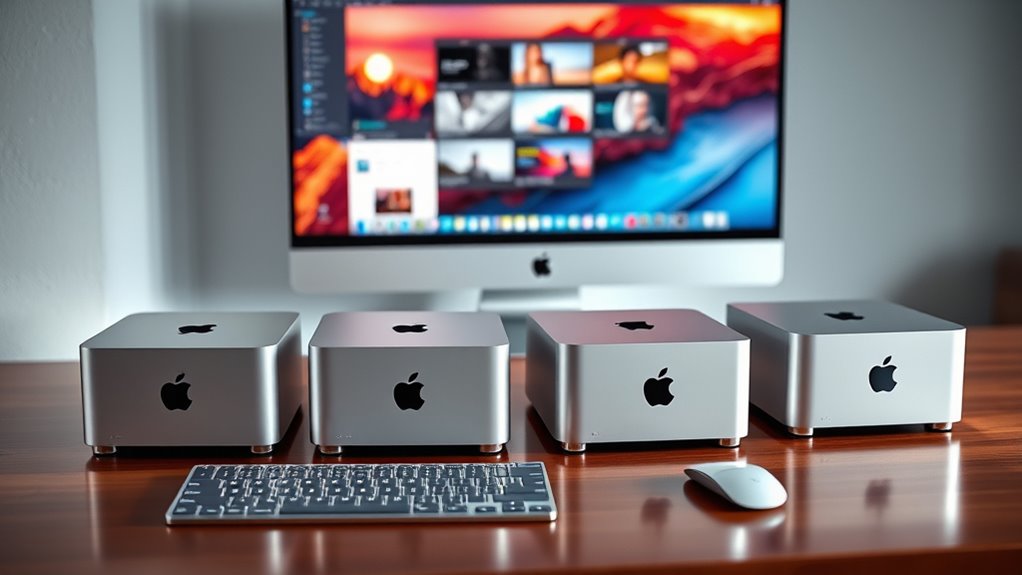

For compact workstation Macs, my best overall pick is the 2026 Mac mini with M5 Pro, which pairs a small footprint with a newer Pro-tier chip for demanding work. The 2026 Mac Studio with M5 Max is the stronger fit for sustained, graphics-heavy workloads, while the 2024 Mac mini with M4 is a practical choice for everyday creative tasks. The main tradeoffs are processing headroom, memory and storage capacity, and how much older hardware you are willing to accept for a simpler desktop setup. Renewed M1 and Intel Mac minis cost less to equip, but their older platforms make them less suitable for growing workloads. Read on for the full breakdown and help matching each Mac to your needs.

Get garden gear delivered free with Prime
- Fast, free delivery on millions of items
- Prime Video, Amazon Music and more included
- Member-only deals all year
Complete the kit

Key Takeaways
- The M5 Pro Mac mini is the roundup’s balanced workstation pick: it offers a newer Pro-class platform in a smaller, less imposing desktop format than the Mac Studio.
- The M5 Max Mac Studio is the performance-first choice: its role makes the most sense when demanding graphics or sustained professional work matter more than a minimal setup.
- The M4 Mac mini stands apart as the middle ground: its 24GB memory and 512GB SSD configuration give it more breathing room than the listed 8GB renewed models.
- The M1 renewed mini is a better entry point than either 2018 Intel option: it is the more modern compact choice for lighter tasks, though its 8GB memory and 256GB SSD limit headroom.
- The two 2018 Mac minis are specialist budget picks, not forward-looking workstations: their Intel platform and 8GB memory make them harder to recommend for newer, demanding workflows.
| Apple Mac mini (2020) with M1 Chip, 8GB RAM, 256GB SSD, Silver (Renewed) |  | Best Entry-Level Mac mini | Processor: Apple M1, 8-core CPU | Graphics: Integrated 8-core GPU | Neural Engine: 16-core | VIEW ON AMAZON | See Our Full Breakdown |
| Apple Mac Studio 2025 with M4 Max, 14-Core CPU, 32-Core GPU, 36GB Memory, 512GB SSD (Renewed) |  | Best Renewed Mac Studio for Pro Workloads | Model year: 2025 | Processor: Apple M4 Max, 14-core CPU | Graphics: 32-core GPU | VIEW ON AMAZON | See Our Full Breakdown |
| Apple Mac mini desktop computer with M5 Pro chip (2026) |  | Best Compact Performance Pick | Processor: Apple M5 Pro | Dimensions: 5 x 5 x 1.97 inches | Weight: 1.61 pounds | VIEW ON AMAZON | See Our Full Breakdown |
| Apple Mac mini (2024) with M4 Chip, 10-Core CPU, 24GB RAM, 512GB SSD, Silver (Renewed) |  | Best Renewed Mac mini Value | Model year: 2024 | Processor: Apple M4, 10-core CPU | Graphics: 10-core integrated GPU | VIEW ON AMAZON | See Our Full Breakdown |
| Apple 2018 Mac Mini (Renewed) – 3.0GHz Intel Core i5, 8GB RAM, 512GB SSD |  | Best Legacy Port Selection | Processor: 3.0GHz Intel Core i5, 6-core | Graphics: Intel UHD Graphics 630 | Memory: 8GB DDR4, 2666MHz | VIEW ON AMAZON | See Our Full Breakdown |
| Apple Mac Studio Desktop Computer with M5 Max Chip (2026) |  | Best for Demanding Creative Work | Processor: Apple M5 Max | Unified memory: Up to 128GB | Memory bandwidth: Up to 614GB/s | VIEW ON AMAZON | See Our Full Breakdown |
| Apple Mac Mini (Late 2018) – Renewed |  | Best for Basic Legacy Setups | Processor: 6-core Intel Core i5 at 3.0GHz | Graphics: Intel UHD Graphics 630 | Memory: 8GB DDR4 at 2666MHz | VIEW ON AMAZON | See Our Full Breakdown |
| compact workstation macs mac studio pick | Processor | Graphics | Storage | Ports |
|---|---|---|---|---|
| Apple Mac mini | Apple M1, 8-core CPU | Integrated 8-core GPU | 256GB SSD | 3 USB ports, 1 HDMI port |
| Apple Mac Studio 2025 with M4 | Apple M4 Max, 14-core CPU | 32-core GPU | 512GB SSD | — |
| Apple Mac mini desktop compute | Apple M5 Pro | — | — | 3 Thunderbolt 5, HDMI, 2 USB-C, 2.5Gb Ethernet, headphone jack |
| Apple Mac mini | Apple M4, 10-core CPU | 10-core integrated GPU | 512GB SSD | 3 Thunderbolt 4, HDMI, Gigabit Ethernet, 2 USB-C, headphone jack |
| Apple 2018 Mac Mini | 3.0GHz Intel Core i5, 6-core | Intel UHD Graphics 630 | 512GB SSD | 4 Thunderbolt 3 (USB-C), HDMI 2.0, 2 USB 3 |
| Apple Mac Studio Desktop Compu | Apple M5 Max | — | — | — |
| Apple Mac Mini | 6-core Intel Core i5 at 3.0GHz | Intel UHD Graphics 630 | 256GB SSD | 4 Thunderbolt 3 (USB-C), 1 HDMI 2.0, 2 USB 3.0 |
More Details on Our Top Picks
Apple Mac mini (2020) with M1 Chip, 8GB RAM, 256GB SSD, Silver (Renewed)
I’d place this renewed M1 Mac mini at the accessible end of a compact workstation shortlist: its small desktop footprint and 8-core chip suit everyday office work, light coding, and modest creative projects. It is a more capable starting point than the 2018 Intel Mac mini for Apple-silicon workflows, but the fixed 8GB memory and 256GB SSD leave less room for large projects and heavy multitasking than the 2024 M4 Mac mini. Video output up to 6K/4K gives it flexibility for a compact desk setup, though the supplied details don’t specify the number of supported displays. I’d choose it for basic workloads, not as a long-term substitute for a Mac Studio. The 90-day limited warranty and renewed condition also make it a less predictable buy than a new machine.
Pros:- Compact desktop design takes little desk space.
- M1 combines an 8-core CPU, 8-core GPU, and 16-core Neural Engine.
- SSD storage and video output up to 6K/4K support a capable basic setup.
- Three USB ports and HDMI provide common wired connections.
Cons:- 8GB unified memory limits heavier multitasking and demanding creative work.
- 256GB SSD can fill quickly with project files and media.
- Renewed condition comes with a 90-day limited warranty.
Best for: Budget-conscious buyers setting up a small desk for office work, browsing, light development, or occasional photo editing.
Not ideal for: Creative professionals working with large files, frequent multitaskers, or buyers who need substantial memory and storage headroom.
- Processor:Apple M1, 8-core CPU
- Graphics:Integrated 8-core GPU
- Neural Engine:16-core
- Memory:8GB unified memory
- Storage:256GB SSD
- Video output:Up to 6K/4K
- Ports:3 USB ports, 1 HDMI port
- Warranty:90-day limited warranty
Our verdict“Choose this renewed M1 Mac mini for a compact, entry-level Apple desktop, but step up to the 2024 M4 model for more memory and storage.”
Apple Mac Studio 2025 with M4 Max, 14-Core CPU, 32-Core GPU, 36GB Memory, 512GB SSD (Renewed)
This renewed Mac Studio with M4 Max is the workstation choice here for buyers whose workloads need more graphics and memory capacity than a compact Mac mini can offer. Its 14-core CPU, 32-core GPU, and 36GB of unified memory make it a stronger fit for demanding creative applications than the 2024 M4 Mac mini, which is smaller and easier to place but has less memory and a less workstation-oriented configuration. The tradeoff is physical: at 6.1 pounds and 10 by 7.7 inches, this Studio takes more room than the 5-inch-square minis. It is also renewed rather than Apple-certified; accessories may be compatible replacements, and the supplied warranty is limited to 90 days. I’d favor it for sustained professional work, while buyers prioritizing the smallest setup should choose a Mac mini.
Pros:- M4 Max pairs a 14-core CPU with a 32-core GPU for demanding workloads.
- 36GB unified memory provides more working room than the listed Mac mini configurations.
- 512GB SSD offers more built-in storage than the 2020 M1 Mac mini.
- Professionally inspected and tested, with a Renewed guarantee.
Cons:- Larger and heavier than the compact Mac mini models in this roundup.
- Renewed, not Apple-certified; accessories may be compatible replacements.
- 90-day limited warranty is shorter than many buyers may want for a workstation.
Best for: Video editors, 3D creators, and other professionals who want Mac Studio-class processing and graphics in a renewed desktop.
Not ideal for: Buyers with very limited desk space, light computing needs, or a preference for a new device and original accessories.
- Model year:2025
- Processor:Apple M4 Max, 14-core CPU
- Graphics:32-core GPU
- Unified memory:36GB
- Storage:512GB SSD
- Dimensions:10 x 7.7 x 3.7 inches
- Weight:6.1 pounds
- Condition and warranty:Renewed; 90-day limited warranty
Our verdict“Pick this renewed Mac Studio if demanding creative work matters more than desk footprint and you accept the renewed-device tradeoffs.”
Apple Mac mini desktop computer with M5 Pro chip (2026)
For buyers who want workstation-level ambition without a Studio-sized enclosure, this M5 Pro Mac mini is the most compact performance-oriented option in the group. Its 5-inch-square body, Thunderbolt 5, and support for up to three external displays make it a good match for a dense multi-monitor desk or demanding technical and creative workflows. Compared with the renewed M4 Max Mac Studio, it is far smaller and lighter, though the supplied details don’t list memory capacity, storage, or CPU/GPU core counts, so I can’t judge its workload ceiling against that Studio from the available data. Its port mix includes 2.5Gb Ethernet and Wi-Fi 7, but no USB-A is listed. Like the other minis, it needs a separate display and peripherals. I’d choose it for compactness and modern connectivity, not on specs alone as a guaranteed Studio replacement.
Pros:- 5 x 5-inch footprint fits tight desks and monitor shelves.
- Three Thunderbolt 5 ports support a modern high-bandwidth workstation setup.
- Supports up to three external displays.
- 2.5Gb Ethernet, Wi-Fi 7, and Bluetooth 6 offer current connectivity options.
Cons:- Memory capacity and SSD storage are not provided in the supplied specifications.
- No USB-A port is listed, which may mean adapters for older peripherals.
- Monitor, keyboard, and other desktop peripherals are separate.
Best for: Developers, technical users, and creative workers who need a very small desktop with Thunderbolt 5 and support for up to three displays.
Not ideal for: Buyers who need specified memory and storage capacity before choosing, built-in USB-A, or a complete desktop package.
- Processor:Apple M5 Pro
- Dimensions:5 x 5 x 1.97 inches
- Weight:1.61 pounds
- Memory bandwidth:307 GB/s
- Ports:3 Thunderbolt 5, HDMI, 2 USB-C, 2.5Gb Ethernet, headphone jack
- Display support:Up to three external displays
- Wireless:Wi-Fi 7 and Bluetooth 6
Our verdict“Choose the M5 Pro Mac mini when a tiny footprint and newer connectivity lead your priorities, but verify memory and storage details before buying.”
Apple Mac mini (2024) with M4 Chip, 10-Core CPU, 24GB RAM, 512GB SSD, Silver (Renewed)
This renewed 2024 M4 Mac mini is my practical middle ground: it keeps the compact 5-inch-square footprint while pairing a 10-core CPU and GPU with 24GB of memory and a 512GB SSD. That makes it a more comfortable everyday workstation than the 2020 M1 Mac mini, whose 8GB memory and 256GB drive are more restrictive. It won’t match the graphics-oriented configuration of the M4 Max Mac Studio, but the smaller size and listed Thunderbolt 4, HDMI, and Gigabit Ethernet connections suit a broad range of desk setups. Its renewed status is the main caveat, and buyers should account for the listed two USB-C ports if their accessories depend on that connection. I’d pick it for mixed office, development, and moderate creative tasks rather than the heaviest professional workloads.
Pros:- 10-core M4 CPU and GPU offer a newer performance tier than the 2020 M1 mini.
- 24GB RAM gives multitasking more headroom than the 8GB M1 and Intel minis.
- 512GB SSD offers twice the listed capacity of the 2020 M1 model.
- Compact 5 x 5-inch case includes Thunderbolt 4, HDMI, and Gigabit Ethernet.
Cons:- Renewed condition may not suit buyers seeking a new device.
- Only two USB-C ports are listed, which can constrain accessory connections.
- Not configured like the M4 Max Mac Studio for demanding graphics-heavy work.
Best for: Home-office users, developers, and creators seeking a compact Mac with more memory and storage than the entry-level M1 mini.
Not ideal for: Professionals with sustained high-end graphics workloads or buyers who require a new, non-renewed computer.
- Model year:2024
- Processor:Apple M4, 10-core CPU
- Graphics:10-core integrated GPU
- Neural Engine:16-core
- Memory:24GB
- Storage:512GB SSD
- Ports:3 Thunderbolt 4, HDMI, Gigabit Ethernet, 2 USB-C, headphone jack
- Wireless:Wi-Fi 6E and Bluetooth 5.3
Our verdict“Choose this renewed M4 mini for a small, versatile workstation with useful memory and storage headroom, but choose the Studio for heavier graphics work.”
Apple 2018 Mac Mini (Renewed) – 3.0GHz Intel Core i5, 8GB RAM, 512GB SSD
This renewed 2018 Intel Mac mini earns a place for its unusually flexible listed connections: four Thunderbolt 3 ports, HDMI 2.0, and two USB 3 ports can make it easier to attach a mix of older and newer peripherals than the newer M5 Pro Mac mini, which lists no USB-A. Its 6-core Intel Core i5 and 512GB SSD can handle everyday desktop tasks, but the 8GB of RAM is a clear limit for demanding creative work or extensive multitasking. Compared with the 2024 M4 Mac mini, it gives up the newer Apple silicon platform and has much less memory, even though the storage capacity matches. I’d consider it for a legacy-peripheral setup or basic workstation role, not as a forward-looking Mac Studio alternative. Renewed condition adds another reason to check the return and support terms.
Pros:- Four Thunderbolt 3 ports offer flexibility for compatible peripherals and displays.
- HDMI 2.0 and two USB 3 ports reduce reliance on adapters for older devices.
- 512GB SSD provides more storage than the 2020 M1 mini in this roundup.
- Six-core Intel Core i5 is suited to everyday desktop work.
Cons:- 8GB RAM can constrain multitasking and professional creative applications.
- Intel platform is older than the M1, M4, and M5 Pro Mac mini options here.
- Renewed condition means it is pre-owned rather than new.
Best for: Buyers with existing USB-A and Thunderbolt 3 accessories who need a compact Mac for basic office tasks and general desktop use.
Not ideal for: Creative professionals, heavy multitaskers, or buyers seeking a newer Apple silicon workstation with more memory headroom.
- Processor:3.0GHz Intel Core i5, 6-core
- Graphics:Intel UHD Graphics 630
- Memory:8GB DDR4, 2666MHz
- Storage:512GB SSD
- Ports:4 Thunderbolt 3 (USB-C), HDMI 2.0, 2 USB 3
- Dimensions:8.26 x 8.2 x 3.22 inches
- Weight:3.5 pounds
- Condition:Renewed
Our verdict“Choose this 2018 Mac mini if its legacy-friendly ports matter most, but favor the 2024 M4 model for a more capable compact workstation.”
Apple Mac Studio Desktop Computer with M5 Max Chip (2026)
The Mac Studio with M5 Max is the performance-led pick here, built for creative and technical work that can use its advanced graphics, high memory bandwidth, and large unified-memory ceiling. Its four Thunderbolt 5 ports and support for up to five displays make it better suited to a multi-screen editing or development desk than the compact Mac mini models in this roundup. The small chassis also leaves less desk space occupied than a conventional workstation, while its thermal system is designed to stay quiet under demanding workloads.
The tradeoff is that this is a fixed desktop, not a portable workstation, and the listed 128GB memory maximum does not identify the configuration on offer. Compared with the Mac Studio 2025 with M4 Max, this model brings a newer chip and faster stated memory bandwidth, but buyers should check the exact configuration rather than assume maximum capacity.
Pros:- M5 Max chip and advanced graphics target demanding creative and professional workloads.
- Up to 128GB of unified memory and 614GB/s memory bandwidth support memory-intensive projects.
- Four Thunderbolt 5 ports and support for up to five external displays suit complex desk setups.
- Compact enclosure and quiet thermal design help keep a workstation footprint modest.
Cons:- The listed memory maximum is not the same as a confirmed configuration; the selected build is unspecified.
- It is a desktop system and cannot serve buyers who need a computer they can carry between workspaces.
- Its performance headroom may be unnecessary for routine browsing and office tasks.
Best for: Video editors, 3D artists, and developers building a fixed workstation with multiple displays and demanding workloads.
Not ideal for: People who need a portable Mac or mainly handle everyday office work that does not need Mac Studio-class graphics and memory capacity.
- Processor:Apple M5 Max
- Unified memory:Up to 128GB
- Memory bandwidth:Up to 614GB/s
- Thunderbolt ports:4 Thunderbolt 5
- Other ports:2 USB-C, 2 USB-A, HDMI, SDXC card slot, headphone jack
- External display support:Up to 5 displays
- Wireless:Wi-Fi 7, Bluetooth 6
- Dimensions and weight:7.76 x 7.76 x 3.74 inches; 5.94 pounds
Our verdict“Choose this Mac Studio for a compact, fixed workstation built around demanding graphics, high memory capacity, and multiple displays.”
Apple Mac Mini (Late 2018) – Renewed
This renewed Late 2018 Mac mini is the low-demand, legacy-system option in a lineup otherwise centered on newer Apple silicon. Its 6-core Intel Core i5, 8GB of RAM, and 256GB SSD can suit basic desktop tasks or a setup that specifically needs an Intel Mac, while four Thunderbolt 3 ports offer useful connectivity for older peripherals. Against the renewed 2020 Mac mini with M1, this model’s main distinction is its Intel platform rather than a stronger case for general performance; the newer M1 is the more appealing direction for many everyday Mac buyers.
The limits are substantial for workstation use: 8GB of RAM, Intel UHD Graphics 630, and macOS Mojave make it a poor fit for modern graphics-heavy work or buyers seeking a current platform. It is also renewed, carries a 90-day limited warranty, and does not include a display. I’d treat it as a targeted legacy pick, not a budget substitute for the M5 Pro Mac mini or Mac Studio.
Pros:- Compact desktop chassis takes up little desk space.
- Six-core Intel processor can handle basic multitasking and routine desktop work.
- Four Thunderbolt 3 ports provide flexible connections for compatible accessories.
- 256GB SSD offers faster local storage than a traditional hard drive.
Cons:- 8GB of RAM and Intel UHD Graphics 630 limit demanding creative and workstation workloads.
- Runs macOS Mojave, making it an older software platform than the Apple silicon options in the roundup.
- Renewed condition, a 90-day limited warranty, and no included display add purchase caveats.
Best for: Buyers who need an inexpensive compact Intel Mac for basic desktop tasks or compatibility with an older Intel-based workflow.
Not ideal for: Creative professionals, buyers who need modern graphics performance, or anyone seeking a long-term workstation with ample memory and a current macOS setup.
- Processor:6-core Intel Core i5 at 3.0GHz
- Graphics:Intel UHD Graphics 630
- Memory:8GB DDR4 at 2666MHz
- Storage:256GB SSD
- Ports:4 Thunderbolt 3 (USB-C), 1 HDMI 2.0, 2 USB 3.0
- Connectivity:802.11ac Wi-Fi, Gigabit Ethernet
- Operating system:macOS Mojave
- Condition and warranty:Renewed; 90-day limited warranty
Our verdict“Choose this renewed Mac mini only if you specifically need a compact Intel Mac for basic or legacy tasks, not as a modern workstation.”

How We Picked
I ranked these compact Macs by how well their processing platform, memory, storage, and desktop footprint match real workstation needs. A newer chip alone does not make a model the best choice: I also weighed the listed configuration and whether a buyer is likely to outgrow it quickly. That puts the M5 Pro Mac mini first for its blend of compactness and higher-tier capability, with the M5 Max Mac Studio ahead for buyers who prioritize maximum performance over size and simplicity.
I treated renewed models and older Intel systems with extra caution because their age and entry-level memory or storage can limit useful life for demanding work. The M4 Mac mini ranks as a sensible everyday-workstation alternative, while the M1 mini and 2018 Intel models suit narrower, lighter-duty needs. Since configurations and condition can vary across renewed listings, I focused on the specifications provided rather than assuming upgrade options or included accessories.
Factors to Consider When Choosing Compact Workstation Macs Mac Studio Picks
Choosing among compact workstation Macs starts with the work you need to finish, not the smallest enclosure or newest chip name. These machines differ most in performance headroom, configuration, platform age, and how much room they leave for heavier tasks. Use the factors below to decide where capability matters and where a simpler desktop is enough.
Match Performance to the Workload
Think about the heaviest task you expect to run regularly, such as editing high-resolution video, compiling large projects, or handling graphics-heavy work. A Pro- or Max-class chip can reduce waits and provide more headroom, but that advantage may go unused for office work, web apps, or light photo editing. A common mistake is choosing a powerful desktop for occasional bursts while overlooking memory and storage limits. If your work is mixed, prioritize the tasks that consume the most time rather than the most impressive specification. The Mac mini format can serve as a capable workstation without taking up Studio space, while a Mac Studio makes more sense when demanding workloads are central to the job.
Treat Memory as a Long-Term Constraint
Memory affects how smoothly a Mac handles several demanding apps, large creative files, and busy browser sessions at once. A machine with 8GB may be adequate for basic use, but it leaves less room for heavier multitasking than configurations with more memory. Do not assume that a fast processor will make a low-memory configuration a strong workstation; these are separate limits. Estimate the apps you keep open together and the size of the projects you handle, then choose enough memory for that combination. More memory headroom can matter more to day-to-day comfort than a small difference in chip tier.
Plan Storage Around Active Projects
The internal SSD holds apps, system files, and the projects you need close at hand, so a smaller capacity can fill quickly with media libraries or large working files. External drives can expand capacity, but they add cables and require a plan for backups and portability. A common buying error is treating external storage as a substitute for enough fast working space, especially when projects are frequently opened and saved. Separate active work from archives: keep current files accessible and back up finished work elsewhere. 512GB versus 256GB can change how much housekeeping your setup demands.
Weigh Platform Age Against the Job
Older renewed Macs can serve a useful role as basic desktops, but age affects more than headline speed: it can narrow the range of workloads and software experiences that feel comfortable over time. The 2018 Intel models belong in a different buying conversation from the newer Apple silicon options. Check the exact model, included configuration, seller condition details, and your required apps before choosing a renewed system. Avoid paying for a legacy machine on the assumption that a future upgrade will solve its limits. Renewed can suit light or secondary use, while a newer platform is the safer direction for a primary workstation.
Choose the Right Desktop Footprint
A compact computer still needs a monitor, keyboard, mouse, and a sensible place for cables and drives. The Mac mini keeps the computer itself especially unobtrusive, while the Mac Studio is a larger desktop designed around more demanding professional needs. Think about desk space, access to ports, ventilation, and whether you will connect several peripherals. A smaller chassis is not automatically better if it leads to a cluttered setup or if the machine cannot keep up with your work. Choose the enclosure for your whole workspace, not just the computer’s listed dimensions.
Set a Clear Ceiling for Future Needs
Buy for the work you reasonably expect to do over the machine’s useful life, but do not pay for capacity you have no plans to use. If your projects are getting larger or your role is shifting toward heavier creative work, moving up to a Pro- or Max-class system may be more practical than replacing an entry-level Mac soon. If the computer is for learning, browsing, or a modest home office, a lower-tier model can leave more room for spending on a display or backup storage. Write down the tasks you expect to add in the next few years and use that list to judge headroom. A realistic upgrade horizon is a better guide than buying the most powerful option by default.
Frequently Asked Questions
Should I choose the Mac Studio or the M5 Pro Mac mini for professional work?
Choose the M5 Max Mac Studio when graphics-heavy work or sustained professional workloads are the main reason for buying a desktop. The M5 Pro Mac mini is the more compact fit if you want a workstation-class direction without stepping up to the larger Studio format. Your workload matters more than the product name: list your most demanding apps and the projects you run at the same time. If those tasks regularly push a system hard, the Studio’s higher-performance positioning is easier to justify. For mixed or moderately demanding work, the Mac mini may be the more balanced choice.
Is an 8GB renewed Mac mini enough for a primary computer?
An 8GB model can work as a primary desktop for browsing, documents, video calls, and other light tasks. It is a less comfortable bet for a workstation that must handle large creative projects or many demanding apps at once. The renewed M1 mini is the more current platform among the 8GB options here, while the 2018 Intel models are better kept to lighter or secondary duties. Think about what you will run simultaneously, not just which apps you use individually. If you expect your workload to grow, a configuration with more memory is the safer long-term choice.
Which Mac mini in this roundup is the most sensible choice for a new desktop setup?
For a newer compact desktop that can handle more than basic daily tasks, the 2024 M4 Mac mini is a balanced option, with 24GB of memory and a 512GB SSD in the listed configuration. The M5 Pro Mac mini is a better fit if your work calls for more processing headroom. The renewed M1 option can suit a simple setup, but its 8GB memory and 256GB SSD leave less room for demanding tasks and larger files. Decide whether you need everyday capability or workstation headroom before paying for the higher tier. Also check the exact listing configuration, particularly if it is renewed.
Are the 2018 Intel Mac minis still worth choosing for a workstation?
They can make sense for basic desktop duties, a secondary computer, or a workflow tied to Intel-specific software. They are not the strongest choice here for someone building a new workstation around demanding current workloads, especially with the listed 8GB memory configurations. The M1 renewed mini is a more modern alternative for light tasks, while the newer M4 and M5 models offer a clearer path for heavier use. Confirm that any required software and peripherals work with the exact model before choosing an older Intel Mac. Treat the 2018 options as narrow-use picks rather than general-purpose workstation recommendations.
How much internal storage should I choose if I already use external drives?
External drives can hold archives, media libraries, and backups, but internal storage still matters for apps and files you work on frequently. A 512GB SSD gives more room for active projects than a 256GB configuration and can reduce how often you need to move files around. If your work relies on large video or design files, consider how quickly your active project folder grows, not only the total size of your archive. Keep a separate backup rather than treating one external drive as both working storage and protection against data loss. Your ideal capacity depends on workflow, but a tight internal drive adds regular housekeeping.
Conclusion
For most buyers seeking a compact workstation, my best overall pick is the 2026 Mac mini with M5 Pro: it balances a small desktop footprint with higher-tier capability. My best premium pick is the 2026 Mac Studio with M5 Max for demanding, graphics-heavy work. The 2024 M4 Mac mini is my best value-style choice for a newer everyday workstation, while the renewed M1 Mac mini is the best beginner pick for lighter tasks and a simpler setup. Choose a 2018 Intel mini only for basic use or a specific Intel-dependent need; for a primary machine expected to handle demanding work, I would favor a newer Apple silicon option.